

How to change road speed and idle shutdown on a Volvo or Mack engine
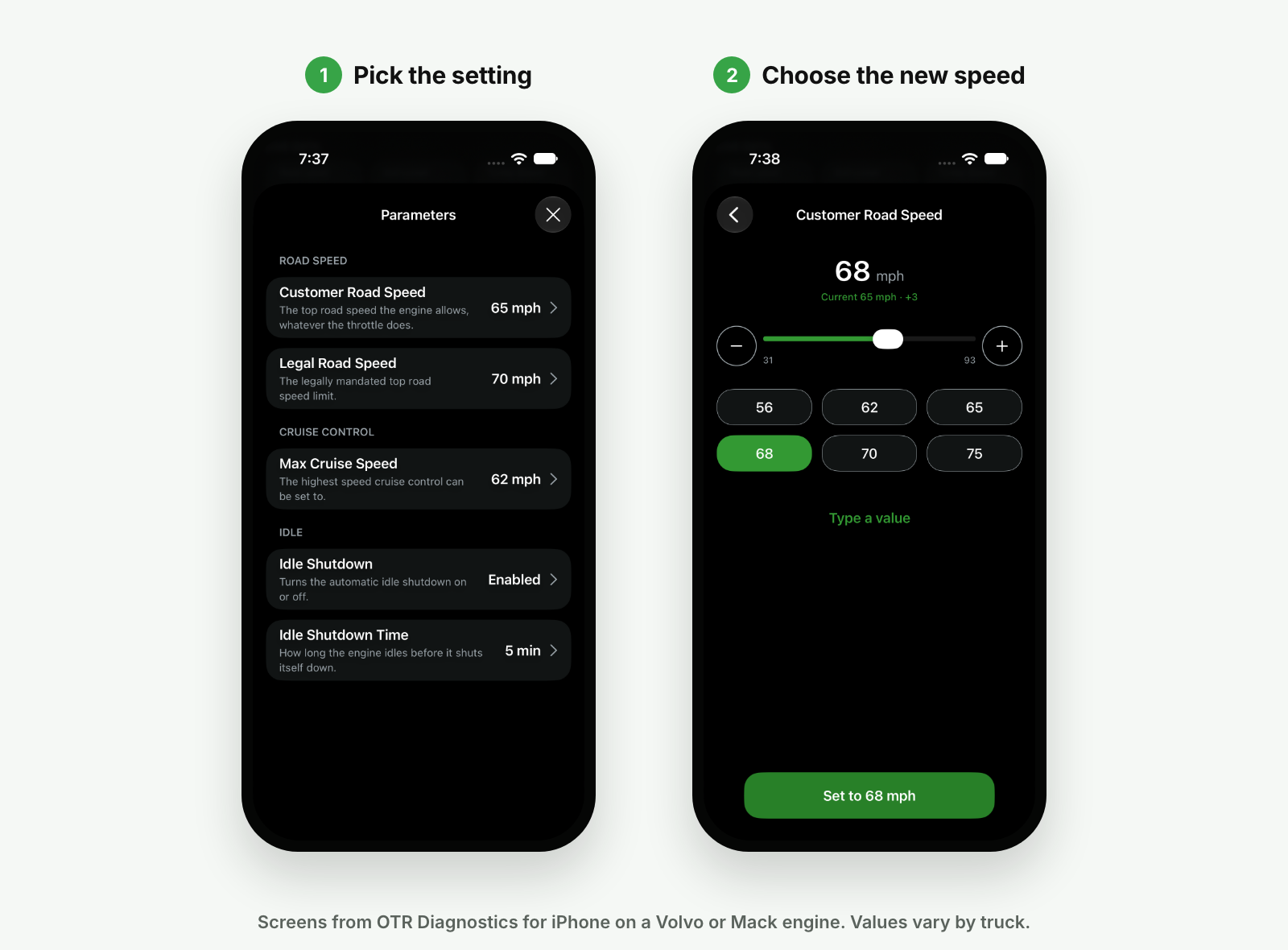
On a Volvo or Mack with a Volvo or Mack engine, you can read and change the road speed, cruise speed and idle shutdown settings in the OTR Diagnostics app. You do it on the Parameters screen with the key on and the engine off, and the engine confirms each change before the app shows it as saved. Android is coming soon.
Covered vehicles
| Model years | Make | Common models | Engine |
|---|---|---|---|
| 2014–2026 | Volvo | VNL, VNR, VNX, VHD, VAH | D11, D13, D13TC, D16 |
| 2014–2026 | Mack highway | Anthem, Pinnacle | MP7, MP8 |
| 2014–2026 | Mack refuse and vocational | LR and TerraPro garbage trucks, Granite | MP7, MP8, MP10 |
| 2014–2026 | Buses and motorhomes | Coaches, buses and motorhomes on a chassis with a supported Volvo or Mack engine | Volvo D11, D13; Mack MP7, MP8 |
- Common models only, not a complete list. Coverage goes by the engine, not the truck or body maker.
- To see what the app detected, open More > About and check the Engine Profile.
- Volvo or Mack with a Cummins engine? See How to change road speed and idle shutdown on a Cummins engine.
The settings
- Customer Road Speed: the top speed the truck will go, whatever the throttle does. This is the one most owners change.
- Legal Road Speed: the top road speed limit set for the truck. Customer Road Speed can't be set above it.
- Max Cruise Speed: the highest speed cruise control can be set to.
- Idle Shutdown: turns automatic idle shutdown on or off.
- Idle Shutdown Time: how long the engine idles before it shuts itself down.
What you need
- OTR Diagnostics 4.3.0 or newer on your iPhone or iPad.
- An active OTR Diagnostics Single Truck or Pro plan.
- Your OTR adapter (we recommend the OTR Link 2) plugged straight into the diagnostic port (not into an ELD or a Y-splitter) and connected in the app.
- The key on and the engine off, for the whole change.
- No other command running.
Change a setting
- On the Dashboard, tap CHANGE PARAMETERS on the PARAMETERS card. Or open the Commands tab and tap Change parameters.
- Tap the setting, for example Customer Road Speed.
- Check Turn key - ON and Engine - OFF at the truck, then tap Continue.
- Choose the new value with the slider, − and +, a preset, or Type a value. For Idle Shutdown, tap a choice.
- Tap Set to the new value, for example Set to 65 mph.
- The app shows Programming ECM. Don't close the app or turn the key off.
- You'll see Update saved, for example "Customer Road Speed is now 65 mph.", and "The change was applied." If it says "Turn the key off and on to apply the change.", do that. Tap Done.
Troubleshooting
- "Not supported on this truck yet": the app can read this truck but can't change that setting on its engine software yet, so nothing was changed. This happens on a few newer Volvo and Mack software versions. The other settings still work.
- A setting shows a dash (—): the engine didn't report it. Close Parameters and open it again. On some Volvo and Mack trucks the idle settings stay blank.
- "Change not confirmed": the engine didn't confirm the new value. Tap Turn the key off, then start over, open Parameters and check the value before you try again.
- "Can't change this right now": the other speed settings leave no room for this one, for example Legal Road Speed is lower than the Customer Road Speed you want. Change the other setting first.
- "Not available": reconnect to the truck and tap Try again.
- No Parameters card: check that your Single Truck or Pro plan is active, the app is up to date, and the Engine Profile under More > About isn't "Generic". See Commands not appearing in the app.
Need help? Contact our support team at support@otrperformance.com or (586) 799-4375, Monday to Friday, 8 am to 5 pm Eastern.
Related
Still need help? Contact us